
Table of Contents
Electronics and Communication Mini Projects with Real Application
4 September 2024
5 min read
A mini project with a hands-on approach in electronics and communication engineering is an avenue wherein a student can turn theoretical knowledge to practical solutions. Mini projects offer a chance of teaching technical skills by means of real-world problems that have been topical at the fast-moving pace of today's technological landscape. Here are some interesting mini projects using very popular electronic components such as Arduino Uno, ultrasonic sensors, and LCD displays in creating a working and impactful solution.

Electronics and communication mini projects with a hands-on approach in electronics and communication engineering is an avenue wherein a student can turn theoretical knowledge to practical solutions. Mini projects offer a chance of teaching technical skills by means of real-world problems that have been topical at the fast-moving pace of today's technological landscape. Here are some interesting mini projects using very popular electronic components such as Arduino Uno, ultrasonic sensors, and LCD displays in creating a working and impactful solution.
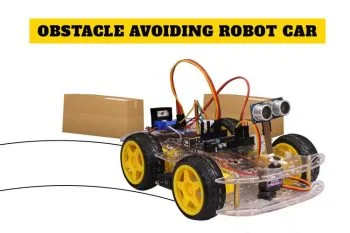
1. Obstacle Avoiding Robot
Used Components:-
- Arduino Uno R3 Development Board compatible with Arduino IDE
- HC-SR04 Ultrasonic Sensor Module
- Servo Motor SG90
- Dual Shaft DC Geared Motor 100 RPM
- 9V Battery Snap Connector
This is a project that involves the development of a simple autonomous robot that avoids obstacles with its use of an HC-SR04 Ultrasonic Sensor. This sensor calculates distances where the robot is from various obstacles, data processed by the Arduino Uno, and the movement guided through DC and servo motors. This work is applied in industrial automation and cleaning up the house using robots for navigation in busy spaces.
Real World Application:
These robots can be applied in warehouses to carry goods or part of the smart vacuum cleaner, hence doing away with the need for manpower and more efficiency.
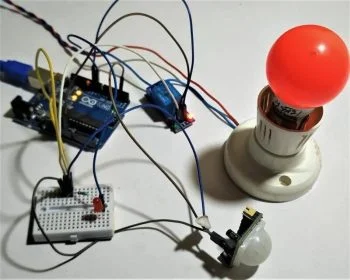
2. Smart Home Security System Using PIR Motion Detection
Components Used:
- Arduino Uno R3 Development Board
- HC SR501 - PIR Motion Detection Sensor
- 16x2 LCD Display (Green Backlight)
- Small Piezoelectric Buzzer - 5V Active Buzzer
- Push Button (4-Pin Tactile Micro Switch)
This motion detecting home security system uses the PIR motion detection sensor called the HC SR501, which activates an alarm and displays the status using a 16x2 LCD. In this application, the Arduino Uno takes the signal from the sensor and runs the control over the display and buzzer. Using a reset of the alarm is made possible with a push button.
Real-World Application:
This project can be included in smart home security systems where it renders motion alerts in real time and helps protect homes against unauthorized access.
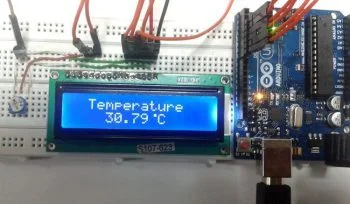
3. Digital Thermometer Using LCD and LM35
Components Used
- Arduino Uno R3 Development Board
- LM35 Temperature Sensor
- 16x2 LCD Display (Green Backlight)
- 10K Ohm Resistor Pack
- Breadboard Jumper Cable Wires (Red and Black)
A digital thermometer is created by connecting an LM35 temperature sensor to the Arduino Uno that takes the reading of the temperature and shows it on a 16x2 LCD. The Arduino processes the analog signal coming out from the sensor with the value given in a readable format for temperature. Further, the project can be interfaced with the IoT platforms and expand in terms of remote monitoring.
Real World Application:
This thermometer will be very useful in both industrial and smart house settings. The device will be able to provide real-time temperature monitoring. It is very cost-effective and can be used in health care and environmental monitoring applications.
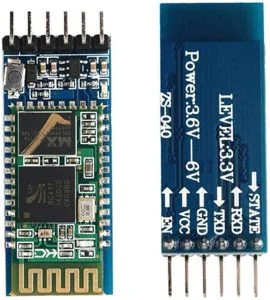
4. HC-05 Bluetooth Module for Wireless Communication
Components:
This project involves the capability of sending data wirelessly between two devices using the HC-05 module in Bluetooth. The Arduino Uno is a device that will have control in transmitting data over the air, and can be used, for instance, to control an LED from a smartphone app. The simplicity that this project holds makes it good even for beginners since they can expand further on other components like motors or home appliances.
Real World Application:
This wireless type can be embedded in home automation systems: lights, fans, or security systems can be controlled by a smartphone.
5. LDR Light-Controlled Automation
Components Used:
- Arduino Uno R3 Development Board
- 5mm LDR (Light Dependent Resistor)
- 5V 10A Relay Module
- 220K Ohm Resistor Pack
- Small Piezoelectric Buzzer
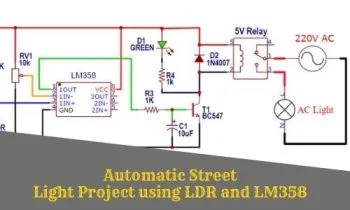
In this project, we used an LDR light dependent resistor to control lights automatically based on the ambient light. The Arduino Uno would process these signals from the LDR and activate a relay that could then turn the lights on or off. For feedback, we added a piezoelectric buzzer.
Practical Uses:
This project is ideal for energy-saving smart lighting to be used in homes, offices, or even in the streets where lights are automatically turned on when dusk falls and are usually off at dawn.
The mini electronics and communication projects bring to light the versatile usages of various components like Arduino Uno, sensors, and LCD displays in solving real-world problems. The projects are applied to hone hands-on skills and innovative solutions in automation, home security, or even IoT. The simple yet worthwhile ideas can be developed further into more complex systems, paving the way for more technological advancement.

Tagged
Frequently Asked Questions
How do I choose the right components for my DIY electronics project?
Begin by listing your project's power and logic level requirements (e.g. 5V, 3.3V), then choose compatible microcontrollers, sensors, and actuators from reputable brands.
Are the guides on the ElectroGlobal blog suitable for beginners?
Yes! Our guides range from basic electronics theories and simple Arduino tutorials to advanced IoT projects and custom PCB design tutorials.
Where can I purchase the components mentioned in these tutorials?
All standard components, sensors, microcontrollers, and repair tools mentioned in our blog posts can be purchased directly from the ElectroGlobal online store.
How do I ensure safety when working with rechargeable batteries?
Always use dedicated battery management systems (BMS) or charger modules, avoid overcharging or short circuits, and handle lithium-ion cells with care in insulated enclosures.
What tools are recommended for soldering electronic boards?
We recommend a temperature-controlled soldering iron, high-quality lead-free solder wire, flux paste, a desoldering pump, and safety glasses.
Can I suggest topics for future tutorials on the blog?
Certainly! We welcome suggestions from our community. You can reach out to our support team or use the Contact Us form to share your ideas.
How do I troubleshoot a circuit that isn't working?
Use a multimeter to verify voltage levels at key nodes, check all ground connections, verify components orientation, and test subsystems independently.
What is RapidChip and how does it help with hardware design?
RapidChip is our web-based collaborative EDA tool that helps users design circuit schematics and layout PCBs quickly, even without prior professional experience.
Does ElectroGlobal ship components across India?
Yes, ElectroGlobal offers reliable shipping services to pin codes across India, with standard and express shipping options available at checkout.
How can I verify the quality of the components I buy?
We source our components from certified distributors and manufacturers to ensure 100% genuine parts, backed by physical visual inspection and testing.